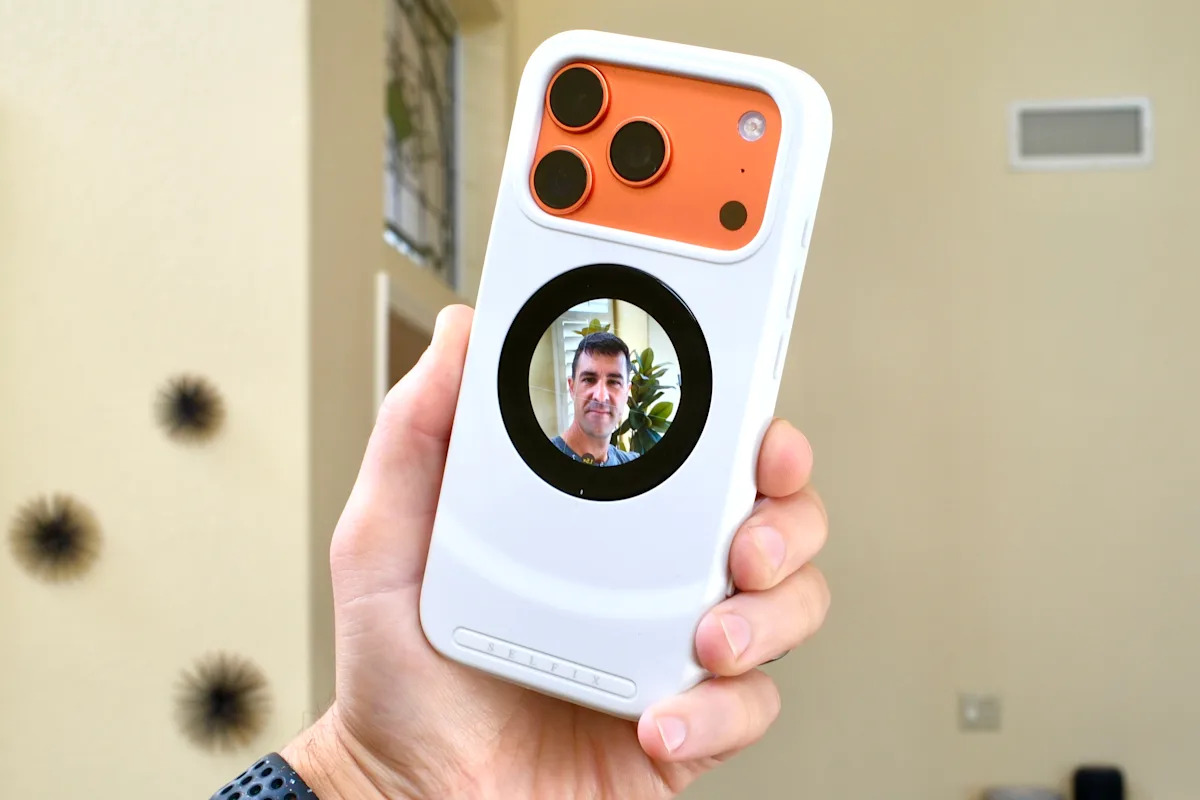
Ask anyone who’s tried to take a decent selfie in a dim bar or a crowded group photo: the front camera is useful, but it’s usually second-best. Dockcase’s Selfix takes a blunt, clever approach — rather than redesigning the phone, it adds a small circular AMOLED display to the back of an iPhone so you can use the main camera for selfies.
The idea is delightfully simple and a little bit bonkers. The Selfix fits the iPhone 17 Pro and 17 Pro Max and houses a 1.6-inch circular AMOLED touchscreen (480 × 480). Slip the case on, plug its USB-C connector into your phone, and it mirrors whatever’s on your screen, so when the Camera app is open you get a live viewfinder for the rear cameras where your thumb normally rests.
What’s inside the case
It’s not just a viewfinder. Key specs and features reported during hands-on time:
- 1.6-inch circular AMOLED touchscreen, 480 × 480 resolution, touch-enabled (mirrors phone display)
- microSD card slot supporting up to 2 TB (UHS-I, Class 10, U3, V30 compatible)
- USB-C pass-through port with PD 3.0 support up to 45 W
- TPU construction with a soft rubber finish and a magnetic ring around the screen for accessories
- Dedicated power button and an option bundle with a crossbody strap and magnetic ring holder
Dockcase is crowdfunding the Selfix on Kickstarter with an early-bird pledge around $79 (retail suggested at $129). The case comes in white, black, and pink, and Dockcase says orders should ship in May if the campaign goes to plan. The company has shipped accessories before, but — as with any crowdfunding purchase — backers take on some risk.
How it behaves in the real world
Reviewers who spent time with the Selfix praised its practicality. Using the rear 48 MP camera for selfies means sharper detail and better low-light performance than the front-facing sensor, and being able to frame yourself with the big camera is an obvious win for creators. The rear display is touch-enabled, but because the case simply mirrors the phone’s output some iOS accessibility toggles (like AssistiveTouch) are needed to make touch inputs on the rear behave as expected.
One reviewer noted that the mirror display can work with third-party camera apps too — which opens possibilities for creators wanting precise control or different codecs. That same reviewer said they were able, in at least one app workflow, to write video data to the microSD card rather than the phone. Dockcase’s public materials, however, caution that recording video directly to the card is not generally supported: the company told some outlets it avoided that capability to limit heat and power draw. The practical upshot is that saving video to SD may work in some apps or setups but isn’t a guaranteed or officially promoted feature.
The trade-offs
Nothing is free, and the Selfix makes a few compromises. The rear screen increases the distance between the phone and a wireless charger’s coils, so most MagSafe wireless charging pads won’t reliably charge through the case. Dockcase does include a USB-C passthrough that supports up to 45 W PD charging, so wired fast charging remains available. Magnetic accessories like ring holders and some mounts still attach to the case’s magnet array, though a MagSafe wallet or puck-style charger could cover part of the rear display.
Because the case mirrors the phone, anything shown on your iPhone’s screen will also appear on the back panel unless you switch the case off — handy when composing, but potentially exposing notifications or other content if you forget. And while the Selfix is designed to be slim, it’s thicker than a plain TPU case and takes up your phone’s USB-C port while attached.
Why this matters (and where it fits)
The Selfix isn’t a radical reinvention of how phones are built; it’s a creative accessory that leans on the iPhone’s best camera and stitches in a small but functional viewfinder and extra storage. For creators who prioritize picture quality, or for people who consistently want better-looking selfies and don’t want to fumble with tripods and remote triggers, it’s a neat workflow hack.
It also highlights how much software matters: getting the rear touchscreen to behave cleanly depends on iOS accessibility features and how apps expose controls. If you’re curious about the kinds of interface and accessibility changes Apple has been making lately, some of the additions in iOS 26 — like more flexible AssistiveTouch options — help explain why a product like this can work at all.
And while the Selfix targets iPhone 17 Pro models today, modular accessories like this underscore why phone makers keep experimenting with camera placements and on-device displays; future handsets may absorb some of these ideas directly — something to watch as rumors swirl about upcoming devices like the iPhone 18 Pro.
If you like the concept, backing a $79 early pledge on Kickstarter is the straightforward route. If you’re cautious about crowdfunding or don’t want to juggle the quirks (AssistiveTouch, intermittent wireless charging compatibility, and the video-to-SD uncertainty), wait and see whether Dockcase ships on time and how third-party apps handle SD workflows.
Either way, the Selfix is a good reminder that, even as handset design consolidates, there’s still room for small accessories to shift how we use phones — and for one more way to get a better selfie without asking someone else to take the shot.